


How do you fold a box? What's the method for making a cardboard box? The answers are right here.
This app helps you create packaging boxes, gift boxes, and craft boxes from corrugated or craft paper, perfect for sending gifts.
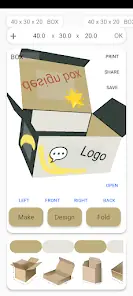
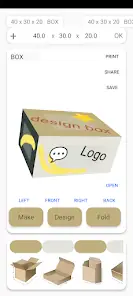
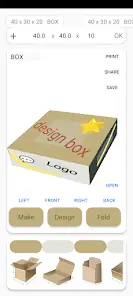
Welcome to the 3D Box Simulator App! Explore various types of corrugated boxes commonly used in packaging and shipping, and enjoy a realistic, interactive experience. The app provides detailed simulations of different box styles, allowing users to visualize and understand their three-dimensional structure.
Key Features:
Shipping Boxes:
Experience the durability and functionality of standard shipping boxes—ideal for safely transporting items from one location to another.
Mail Boxes:
Try out the convenience of compact, lightweight mail boxes designed for efficient dispatch. Visualize how this box protects your item during transit.
Literature Boxes:
Step into the world of literary packaging with boxes specifically designed for books, documents, and other printed materials. Discover protective designs tailored to literary works.
Retail Boxes:
Enter the retail industry through retail box simulation. Evaluate how this box enhances product presentation on store shelves.
Tray (DST Design Style Tray):
Explore the innovative DST design style tray, featuring a unique structure to meet special packaging needs. Experience its versatility across various scenarios.
RETT (Roll-End Tuck Top):
Feel the convenience of the Roll-End Tuck Top (RETT) box—easy to access and securely closed. Explore its applications in retail and product packaging.
For packaging professionals, design students, or anyone curious about the complexity of cardboard boxes, this 3D simulator app is an invaluable educational tool. Interact with each box, rotate it in 3D space, and gain insights into its purpose and benefits. Download the 3D Box Simulator App now and virtually explore the world of cardboard packaging.
1. Camera-Based Verification:
Use your device’s camera to capture a physical cardboard template.
The app overlays a digital template onto the captured image for visual verification.
2. Simple Dimension Input:
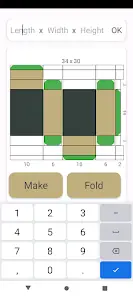
Intuitively enter box dimensions such as length, width, and height.
3. Real-Time Template Preview:
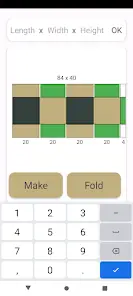
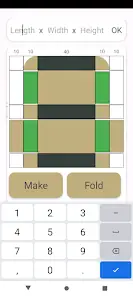
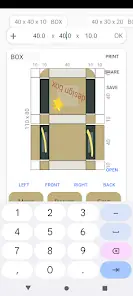
Instantly visualize the generated box template based on the input dimensions.
Box Template Generator
Welcome to the ultimate tool for creating customized corrugated boxes—the Box Template Generator. This app simplifies the box design process by allowing you to input width, height, and length, instantly generating a comprehensive, personalized box template.
Key Features:
Custom Dimensions:
Enter your desired values for width, height, and length to match your specific requirements.
The app dynamically generates a complete box template containing all necessary dimensions and structural details.
Visual Preview:
View an interactive visual representation of the box template to better understand its structure.
Print and Build:
Once satisfied with the template, print it and use it as a guide to construct your custom box.
How to Use:
Open the app and enter the box’s width, height, and length.
Tap the "Generate Template" button to instantly display a comprehensive box template including dimensions and structural details.
Print the template and begin constructing your custom box.
Who Can Benefit:
DIY Enthusiasts
Small Business Owners
Packaging Designers
Students and Educators
Whether you're shipping products, creating unique packaging, or exploring the art of box design, the Box Template Generator is a reliable tool. No complex calculations or measurements required—design the perfect box effortlessly. Download now and bring your ideas to life.
This app leverages the built-in camera to quickly and efficiently verify the accuracy of physical cardboard templates against their digital counterparts.
This app helps you create packaging boxes, gift boxes, and craft boxes from corrugated or craft paper, perfect for sending gifts.
Welcome to the 3D Box Simulator App! Explore various types of corrugated boxes commonly used in packaging and shipping, and enjoy a realistic, interactive experience. The app provides detailed simulations of different box styles, allowing users to visualize and understand their three-dimensional structure.
Key Features:
Shipping Boxes:
Experience the durability and functionality of standard shipping boxes—ideal for safely transporting items from one location to another.
Mail Boxes:
Try out the convenience of compact, lightweight mail boxes designed for efficient dispatch. Visualize how this box protects your item during transit.
Literature Boxes:
Step into the world of literary packaging with boxes specifically designed for books, documents, and other printed materials. Discover protective designs tailored to literary works.
Retail Boxes:
Enter the retail industry through retail box simulation. Evaluate how this box enhances product presentation on store shelves.
Tray (DST Design Style Tray):
Explore the innovative DST design style tray, featuring a unique structure to meet special packaging needs. Experience its versatility across various scenarios.
RETT (Roll-End Tuck Top):
Feel the convenience of the Roll-End Tuck Top (RETT) box—easy to access and securely closed. Explore its applications in retail and product packaging.
For packaging professionals, design students, or anyone curious about the complexity of cardboard boxes, this 3D simulator app is an invaluable educational tool. Interact with each box, rotate it in 3D space, and gain insights into its purpose and benefits. Download the 3D Box Simulator App now and virtually explore the world of cardboard packaging.
1. Camera-Based Verification:
Use your device’s camera to capture a physical cardboard template.
The app overlays a digital template onto the captured image for visual verification.
2. Simple Dimension Input:
Intuitively enter box dimensions such as length, width, and height.
3. Real-Time Template Preview:
Instantly visualize the generated box template based on the input dimensions.
Box Template Generator
Welcome to the ultimate tool for creating customized corrugated boxes—the Box Template Generator. This app simplifies the box design process by allowing you to input width, height, and length, instantly generating a comprehensive, personalized box template.
Key Features:
Custom Dimensions:
Enter your desired values for width, height, and length to match your specific requirements.
The app dynamically generates a complete box template containing all necessary dimensions and structural details.
Visual Preview:
View an interactive visual representation of the box template to better understand its structure.
Print and Build:
Once satisfied with the template, print it and use it as a guide to construct your custom box.
How to Use:
Open the app and enter the box’s width, height, and length.
Tap the "Generate Template" button to instantly display a comprehensive box template including dimensions and structural details.
Print the template and begin constructing your custom box.
Who Can Benefit:
DIY Enthusiasts
Small Business Owners
Packaging Designers
Students and Educators
Whether you're shipping products, creating unique packaging, or exploring the art of box design, the Box Template Generator is a reliable tool. No complex calculations or measurements required—design the perfect box effortlessly. Download now and bring your ideas to life.
This app leverages the built-in camera to quickly and efficiently verify the accuracy of physical cardboard templates against their digital counterparts.